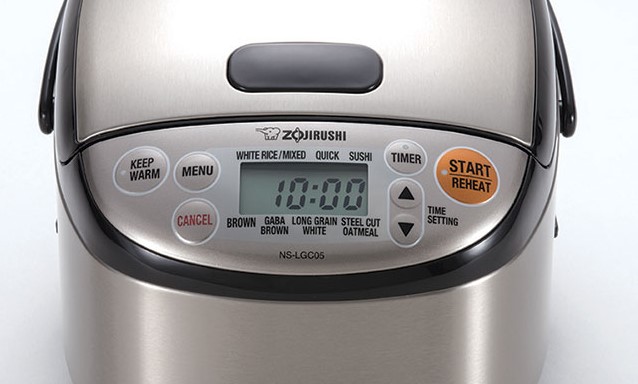
Zojirushi Rice Cooker Buttons Not Working [Immediate Troubleshooting Steps]
If you find your Zojirushi rice cooker buttons not working, don’t panic. Most of the time, this issue stems from moisture buildup, a locked control panel, or simple internal debris that can be fixed with a few easy home maintenance steps.
We have all been there. You are ready to make a perfect batch of fluffy jasmine rice for dinner, you walk up to your trusty Zojirushi, and suddenly, nothing happens. You press the “Start” button, and it feels like you are pushing against a ghost. If you are currently staring at a Zojirushi rice cooker buttons not working situation, you are definitely not alone. Even the most reliable kitchen appliances run into hiccups occasionally.
In 2026, Zojirushi continues to lead the market with high-end induction heating and fuzzy logic technology, but even the best electronics have a breaking point. Whether you have the classic neuro-fuzzy model or the latest pressure induction cooker, the interface panel is the most used part of the machine. Let’s dive into why this happens and, more importantly, how you can get your kitchen back on track today.
Key Takeaways
- Moisture is the Enemy: Steam and condensation are the most common reasons your Zojirushi rice cooker buttons not working properly.
- Check the Child Lock: Many models include a safety feature that disables buttons; ensure this hasn’t been accidentally activated.
- Clean the Interface: Over time, kitchen grease or residue can build up under the touch membrane, preventing electrical contact.
- Power Cycling Matters: Often, a simple reset by unplugging the unit for ten minutes clears minor logic board glitches.
- Safety First: Never attempt to take apart the internal wiring if your unit is under warranty, as this will void your coverage.
Understanding the Control Panel Interface
To understand why your Zojirushi rice cooker buttons not working, you first need to understand what is happening under the surface. Most Zojirushi models use a membrane switch system. This is a thin layer of plastic with conductive material underneath. When you press a button, you are pushing two layers together to complete an electrical circuit. This tells the computer inside the rice cooker what to do.
The Role of Moisture and Steam
The biggest culprit is almost always moisture. Since these machines are designed to boil water, steam is everywhere. If your rice cooker is placed directly under a cabinet, the steam rises and can condense right onto the control panel.
Even a tiny amount of moisture can seep behind the membrane. This creates a “phantom press” or stops the contact from happening entirely. If your Zojirushi rice cooker buttons not working, the first step is always checking for trapped steam.
The Logic Board Sensitivity
Zojirushi uses a sophisticated computer chip called “Fuzzy Logic” to adjust temperature and cooking time. This chip is sensitive. If the power supply in your home has a surge or a dip, or if the unit gets too hot, the control panel may become temporarily unresponsive. This is a safety feature designed to protect the internal motherboard from damage.
Immediate Troubleshooting Steps
Before you call customer support or start looking for a replacement, try these quick fixes. Most of the time, the problem is not a broken part but a environmental or operational one. Take a deep breath and follow these steps in order.
The Power Reset Technique
Computers are everywhere, and your rice cooker is no different. Sometimes the internal logic gets stuck in a loop. Unplug your Zojirushi from the wall outlet completely. Wait at least ten to fifteen minutes. During this time, the capacitors inside the power supply will discharge. Plug the unit back in directly to a wall outlet—not a power strip—and see if the display lights up or responds to your touch.
Checking for the Child Lock
Did you know your rice cooker might have a security feature? Many high-end Zojirushi models include a child lock to prevent accidental changes to the settings. If a specific light is blinking or if the display seems locked, look for a “Menu” or “Cancel” button that you might need to hold down for three to five seconds to unlock the interface. Check your specific model number in the manual or online to see if a lock icon is active.
Cleaning the Control Panel Properly
If the Zojirushi rice cooker buttons not working, it might just be dirty. Kitchens are messy places. Airborne grease, flour dust, and sticky residue from cooking can get into the seams of the buttons. This buildup prevents the button from clicking down far enough to make the electrical contact.
Safe Cleaning Methods
Use a dry, soft microfiber cloth to wipe down the panel. If you need a bit more power, dampen the cloth slightly with a tiny drop of rubbing alcohol. Never spray cleaner directly onto the panel, as it will run into the gaps. Gently press around each button to see if you can feel a “sticky” spot. Usually, a thorough cleaning solves the issue where the button press isn’t registering.
Removing Hidden Debris
Sometimes, a crumb can get stuck right on the edge of a button. Take a toothpick or a soft-bristled toothbrush and very gently brush around the edges of the unresponsive button. Do not force anything inside the casing. You are looking to dislodge debris, not dig it out. Once you have cleared the area, try pressing the button again with firm, steady pressure.
When Should You Consult a Professional?
If you have tried the reset and cleaned the panel, but you still have a Zojirushi rice cooker buttons not working situation, the issue might be internal. There are some signs that indicate it is time to stop tinkering and let a pro look at it.
Signs of Internal Board Failure
If the screen is flickering, displaying strange characters, or showing an error code (like E01 or E02), this is a hardware failure. Error codes often point to a sensor malfunction or a board error that regular troubleshooting cannot fix. If the internal motherboard is fried, the buttons will never work because they cannot send the signal to the chip.
The Warranty Consideration
If your unit is less than a year old, do not open the case. Opening the housing will void your Zojirushi warranty immediately. Zojirushi support is excellent and usually prefers to handle repairs at authorized service centers. Check your purchase date and keep your receipt handy. Even if it is out of warranty, contact them; sometimes they can offer repair services that are cheaper than buying a brand-new top-tier cooker.
Preventing Future Button Issues
Prevention is much easier than fixing a Zojirushi rice cooker buttons not working problem. By changing how you place and maintain your rice cooker, you can ensure it lasts for another decade of perfect rice.
Optimal Placement in the Kitchen
Do not place your rice cooker under low-hanging cabinets where steam can gather. Keep it on an open island or near a window where steam can escape freely. If you must keep it under a cabinet, pull the unit forward while it is cooking. This prevents the moisture from settling on the control panel, which is the leading cause of button failure.
Maintenance Routine
Once a month, do a deep clean. Wipe the entire exterior with a damp cloth, and pay extra attention to the control panel area. Ensure that the cord is not pinched or fraying, as a bad power cord can cause intermittent signal issues that look like broken buttons. Treat your rice cooker like a computer, and it will treat your rice like gold.
Conclusion
Dealing with a Zojirushi rice cooker buttons not working can be frustrating, especially when you are hungry. However, in 2026, we have more resources than ever to fix these common kitchen gadgets. Most problems are solved by simply unplugging the device, cleaning the surface, or moving it away from steam. If these steps do not help, rely on professional repair services to keep your investment running.
Remember that your rice cooker is a precision machine. It relies on internal sensors and electrical contacts that need to stay dry and clean to function. By following the tips in this guide, you should be back to enjoying perfect, fluffy rice in no time. Keep your cooking area well-ventilated, keep the buttons clean, and your Zojirushi will continue to be the star of your kitchen for years to come.
Frequently Asked Questions
Why is my Zojirushi screen displaying an error code?
Error codes usually indicate a sensor or internal logic board issue. Try unplugging the device for 10 minutes to reset it, and if the code persists, consult your manual to see what the specific code represents.
Can I use a hair dryer to dry out a wet control panel?
Do not use a hair dryer, as the excessive heat can melt the plastic membrane or damage internal components. Simply let the unit air dry for 24 hours in a well-ventilated area.
How often should I clean the exterior of my rice cooker?
You should wipe down the control panel and exterior with a damp cloth at least once a week. This prevents grease buildup and keeps the buttons responsive over time.
Is it safe to leave my Zojirushi plugged in all the time?
Yes, it is safe, but if you notice that the buttons become unresponsive frequently, unplugging it when not in use can help the internal system reset regularly.
What does “Fuzzy Logic” mean for my rice cooker?
Fuzzy Logic is a type of programming that allows the rice cooker to make small adjustments to cooking time and temperature based on the environment. It is why your rice comes out consistent regardless of the season.
Should I replace the unit if the buttons are broken?
Only replace the unit if a professional repair shop determines the motherboard is fried. If the unit is out of warranty and the repair cost is more than 50% of a new model, then replacement is the smarter financial choice.