How To Work A Toaster: Easy Step-By-Step Guide
To work a toaster in a U.S. kitchen, place the toaster on a dry, clear counter, plug it into a working 120-volt outlet, set the browning level, place bread in the slots, and press the lever down. The toaster heats the bread, then lifts it when the cycle ends.
Introduction
Most countertop toasters in the United States have the same basic parts: slots, a loading lever, a browning control, and one or more function buttons. Some models also include settings for frozen bread, bagels, or reheating.
This guide explains how to use a standard electric toaster safely. Controls may differ by brand and model, so check the owner’s manual if your toaster has unusual buttons or displays.
What You Need Before You Start
Before you use a toaster, check these basic conditions:
- The toaster is on a flat, dry, heat-safe counter.
- The cord and plug have no cuts, burns, or loose parts.
- The toaster is away from the sink, water, curtains, paper towels, and other items that can burn.
- The crumb tray is in place.
- The bread fits inside the slots without being forced.
- The outlet is suitable for the toaster’s plug.
Keep the toaster near an outlet rather than using an extension cord. If you must use an extension cord, follow the toaster maker’s instructions and use a cord rated for the appliance. Do not use a damaged toaster or a plug that feels hot during use.
A toaster is made for bread and similar items that the manual allows. It is not a small oven. Do not place foil, metal utensils, plastic, paper, or oversized food inside it.
How to Use a Toaster Step by Step
Follow these steps for normal toast.
1. Put the toaster in a safe place
Set the toaster on a stable, dry counter with open space around it. Keep the top and sides clear. Do not place it under a cabinet if the heat could damage the cabinet or trap smoke.
Stay nearby while the toaster runs. Do not use it while sleeping or leave it running when you leave the room.
2. Plug in the toaster
Plug the toaster directly into a suitable wall outlet when possible. Make sure the plug is fully inserted.
If the toaster does not light up or respond, test the outlet with another safe appliance. Check whether a circuit breaker or ground-fault circuit interrupter, often called a GFCI, has tripped.
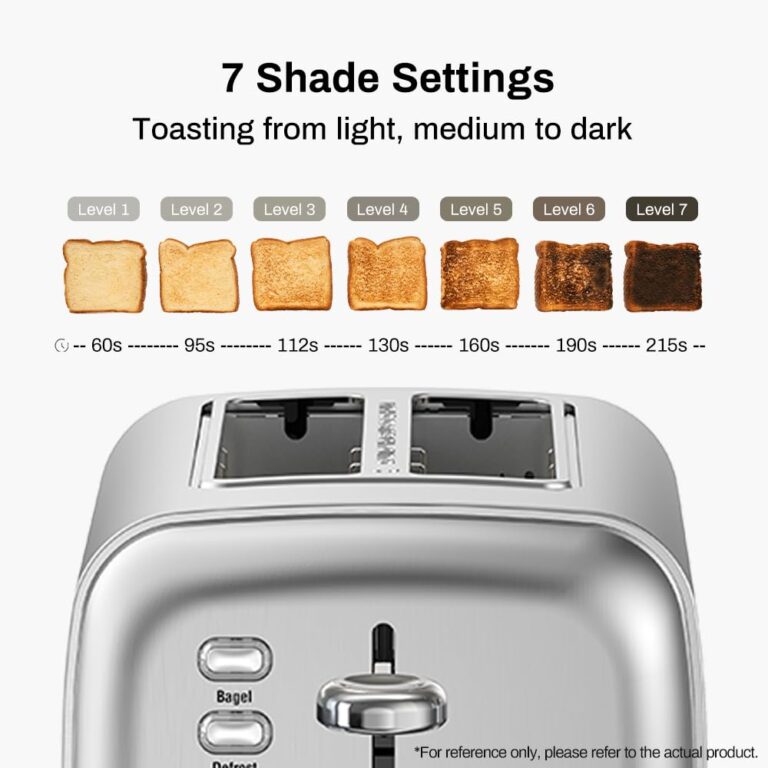
3. Choose the browning level
Turn the browning dial or press the control for the level you want.
As a general guide:
- Low setting: Light toast
- Middle setting: Medium toast
- High setting: Dark toast
The numbers are not universal. A “3” on one toaster may produce a different result from a “3” on another toaster. Bread type, moisture, thickness, and starting temperature also affect the result.
For a first use, choose a middle-low setting. You can raise or lower the setting after seeing the result.
4. Place the bread in the slots
Put one slice of bread into each slot you plan to use. Center the slices so they can move down freely.
Do not force thick bread into a narrow slot. Do not toast bread with loose toppings, exposed fillings, or materials that may melt or drip unless the toaster manual specifically allows it.
For foods such as toaster pastries, follow the package directions and the toaster maker’s instructions. Some filled foods can leak, smoke, or catch fire if used in the wrong appliance.
5. Press the lever down
Press the loading lever down until it locks into place. The bread will move into the toaster, and the heating elements will turn on.
If the lever will not stay down, the toaster may not have power, or the internal control may have a fault. Do not hold the lever down by hand. Unplug the toaster and inspect it only after it has cooled.
6. Watch the toast during the cycle
Look and listen for signs of normal operation. The toaster may make a light heating sound, and the bread should begin to warm and brown.
Smoke, a strong burning smell, sparks, or an unusual buzzing sound is not normal. If any of these occur, cancel the cycle if the toaster has a cancel button. If you cannot stop it safely, unplug it if the plug and outlet are safe to reach. Do not put your hand inside the toaster.
7. Let the toaster lift the bread
When the cycle ends, the lever should rise and the toast should pop up. Let the bread cool for a short time before eating it because the surface and crumbs may be hot.
If the bread stays down, press the cancel button if one is available. Unplug the toaster after it cools if the lever still does not rise.
8. Adjust the next cycle
If the toast is too pale, use a slightly higher setting next time. If it is too dark, choose a lower setting.
Do not immediately run the same slice through several high-heat cycles. Very dark or burned bread can create smoke and may set off a smoke alarm.
How to Use Common Toaster Buttons
Toaster controls vary, but these buttons are common.
Cancel
The cancel button stops the cycle and raises the bread. Use it when the toast looks done or if you see smoke.
Do not pull the lever up by force unless the manual says that the lever is designed for manual lifting.
Frozen
The frozen button usually adds time or changes the heating cycle for frozen bread. Place the frozen slice in the slot, choose the browning level, and press the frozen button before or just after pressing the lever, depending on the model.
Follow the button order in the manual. Some models combine frozen and defrost functions.
Bagel
A bagel setting often heats the cut side more than the outside side. Place the bagel halves with the cut sides facing the center of the toaster if the manual gives that instruction.
Do not assume every toaster heats both sides in the same way. Check the markings near the slots.
Reheat
A reheat setting warms toast without adding as much browning as a normal cycle. It may work well when toast has cooled but does not need to become darker.
Use a normal setting if the bread needs more browning.
Extra lift
Some toasters let you raise the lever higher after the cycle. This helps remove small pieces without using a knife or fork.
Even with an extra-lift feature, unplug the toaster before trying to remove stuck food.
How to Use a Toaster Safely
Safe toaster use depends on keeping heat, electricity, and loose crumbs under control.
The U.S. Consumer Product Safety Commission advises consumers to keep toasters away from water and combustible materials and to unplug them when they are not in use. The CPSC toaster safety guidance also warns against inserting objects into a toaster.
Follow these rules:
- Never insert a knife, fork, spoon, or other metal object into a plugged-in toaster.
- Unplug the toaster before cleaning or removing stuck food.
- Do not place the toaster near water or touch it with wet hands.
- Do not cover the toaster while it is operating.
- Do not use it near curtains, paper, towels, or other flammable items.
- Do not operate it if the cord, plug, controls, or housing is damaged.
- Do not leave it running when you leave the room.
- Keep children away from the toaster while it is hot.
- Do not try to repair internal toaster parts unless you are qualified to do so.
If a piece of bread is stuck, unplug the toaster first. Let it cool completely. Turn it upside down over a sink or trash can and gently shake it. Never stab the bread with a metal tool.
If the toaster catches fire, do not pour water on it. Unplug it only if you can do so without touching flames or a hot area. Move away and call 911 if the fire does not stop at once or spreads. A home fire extinguisher rated for electrical fires may help when used from a safe position and according to its label.
How to Clean a Toaster
Clean a toaster only after unplugging it and allowing it to cool.
- Unplug the toaster.
- Remove the crumb tray if the model has one.
- Empty the crumbs into a trash can.
- Wash the tray only if the manual allows it.
- Dry the tray fully before replacing it.
- Turn the toaster upside down over a sink or trash can.
- Shake it gently to release loose crumbs.
- Wipe the outside with a slightly damp cloth.
- Dry the outside before plugging the toaster back in.
Do not pour water into the slots. Do not spray cleaner into the toaster. Do not use the toaster if crumbs, grease, or food residue remain near the heating elements.
The National Fire Protection Association lists cooking equipment as a major source of home fires in the United States. Its home cooking safety guidance supports staying in the kitchen while cooking and keeping flammable items away from heat.
Troubleshooting a Toaster
Use this order when something goes wrong: stop the cycle, remove the power safely, let the toaster cool, and then check simple causes.
| Problem | Possible cause | Safe next step |
|---|---|---|
| The toaster does not turn on | No power, tripped breaker, or damaged cord | Test the outlet and inspect the plug; replace the toaster if damaged |
| The lever will not stay down | No power or internal fault | Do not hold it down; unplug the toaster and consult the manual |
| Toast is too light | Low setting, thick bread, or a short cycle | Raise the setting slightly on the next cycle |
| Toast is too dark | High setting, thin bread, or repeated cycles | Lower the setting and avoid repeated high cycles |
| One side browns more | Uneven heating or bread position | Center the bread; replace the toaster if the problem continues |
| Bread is stuck | Slice is too large or bent | Unplug, cool, and gently shake out the bread |
| The toaster smokes | Crumbs, food residue, or burning bread | Cancel, unplug if safe, and clean after cooling |
| The plug or cord gets hot | Overload, poor connection, or electrical fault | Stop using the toaster and have it checked or replaced |
| The toaster makes sparks | Metal, damage, or internal failure | Unplug only if safe; do not use it again |
A small amount of first-use odor may occur with some new appliances, but strong smoke, flames, repeated sparks, or a burning-plastic smell requires immediate attention. The safest choice is to stop using the toaster.
Why Toast Can Turn Out Unevenly
Uneven toast usually comes from a mix of bread and toaster factors.
Bread with different thicknesses can brown at different rates. Frozen bread may need a longer cycle. Moist bread may take more time, while thin or dry bread can darken quickly.
Place slices in the center of the slots. Use the same slot and setting when comparing results. If one side stays pale across several cycles with similar bread, the toaster may have a failed heating element or control.
Toaster Settings: A Simple Decision Guide
Use this guide when choosing a function.
| Situation | Setting to try | Reason |
|---|---|---|
| Fresh sliced bread | Normal toast | Standard heating cycle |
| Toast is already brown but cold | Reheat | Adds warmth with less browning |
| Bread is frozen | Frozen or defrost | Adds time for the frozen center |
| Bagel half needs a crisp cut side | Bagel | May direct more heat to one side |
| Bread is very thin | Low setting | Reduces the chance of burning |
| Bread is thick | Medium or higher setting | May need more time, if it fits safely |
These settings are general. The owner’s manual is the correct source for the exact button sequence and food limits for your model.
Common Mistakes to Avoid
The most common toaster mistakes involve forcing food, using metal tools, or ignoring signs of electrical trouble.
Avoid these errors:
- Choosing a high setting without watching the first cycle.
- Pushing thick bread into a slot.
- Removing stuck bread with a fork.
- Cleaning the toaster while it is plugged in.
- Using water to put out a toaster fire.
- Leaving the toaster under cabinets with no space for heat.
- Continuing to use a toaster that sparks or smells like burning plastic.
- Assuming the same number on every toaster produces the same level of browning.
- Putting buttered bread, cheese, or loose toppings into a standard pop-up toaster.
- Treating a toaster as a substitute for a toaster oven.
If you need to heat food with toppings, fillings, or a large shape, use an appliance designed for that food and follow its instructions.
Frequently Asked Questions
Do I need to unplug a toaster after using it?
Unplugging it after use adds a layer of safety, especially when the toaster is near water, children, pets, or flammable items. Always unplug it before cleaning or removing stuck food.
Can I use aluminum foil in a toaster?
Do not use aluminum foil in a standard toaster unless the manufacturer’s manual clearly permits it for that exact model. Foil can contact heating elements or create an electrical hazard.
Why does my toaster keep popping up?
The lever may not lock because the toaster lacks power, has crumbs blocking the mechanism, or has an internal fault. Check the outlet and clean the toaster only after unplugging it. If the problem continues, replace or professionally service the toaster.
Can I toast frozen bread?
Many toasters have a frozen or defrost function. Use it when available and follow the manual. A standard cycle may leave the center cold or cause the outside to brown before the bread warms through.
What should I do if my toast is stuck?
Press cancel if the toaster has that button. If the bread does not rise, unplug the toaster, wait for it to cool, and gently shake it over a sink or trash can. Never use a knife or fork inside the toaster.
Key Takeaways
- Put the toaster on a dry, clear counter.
- Start with a low or medium browning setting.
- Center the bread and press the lever down.
- Watch the toaster while it runs.
- Use cancel to stop a cycle early.
- Unplug the toaster before cleaning or removing stuck bread.
- Never insert metal objects into a toaster.
- Stop using the toaster if it sparks, smokes heavily, or has a damaged cord.
Conclusion
Using a toaster is simple: choose a safe location, set the browning level, place the bread in the slots, press the lever, and monitor the cycle. Start with a lower setting until you learn how your toaster and bread work together.
Keep the toaster dry and clear of flammable items. Unplug it before cleaning or clearing a jam, and replace it when it shows signs of electrical damage or repeated malfunction.