How To Open A Black And Decker Toaster: Quick Guide
To open a Black+Decker toaster in the United States, first unplug it and let it cool. Remove the crumb tray, check for hidden screws on the bottom, and use a small screwdriver to remove only the fasteners that hold the outer case. Do not force the case apart. Some Black+Decker toaster models use clips, tamper-resistant screws, or a case design that is not meant for home repair.
Opening the toaster may help you remove crumbs, inspect a loose part, or reach the power cord. It can also expose sharp metal edges and live electrical parts. If the toaster smells burnt, trips a circuit breaker, sparks, or has a damaged cord, replacement or service is often safer than repair.
Before You Open the Toaster
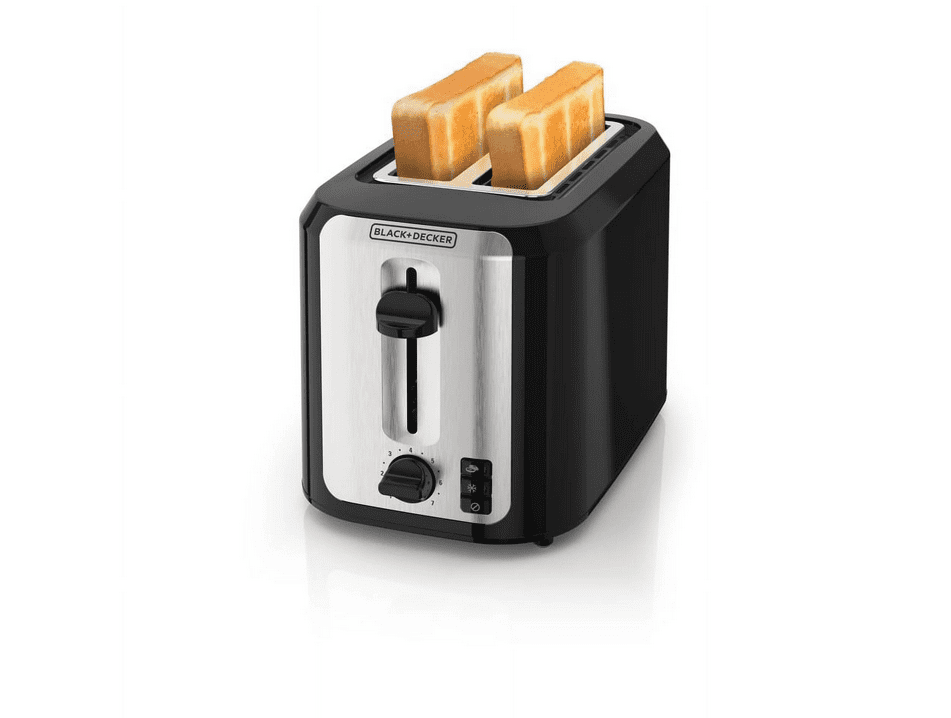
Confirm the exact model before removing any screws. Black+Decker sells several toaster designs in the U.S., and the screw locations and case parts may differ. Look for the model number on the bottom, rear label, rating plate, or original packaging.
You may need:
- A Phillips screwdriver
- A flat screwdriver or plastic pry tool
- A flashlight
- A small container for screws
- Work gloves for sharp metal edges
- A phone camera to record each step
Use a clean, dry table with good light. Keep the toaster away from water, food, and children.
Check the warranty first
Opening the toaster may affect warranty service. Read the warranty terms in the manual before removing screws. Black+Decker manuals and support information are available through the brand’s U.S. appliance support website: Black+Decker Appliance Support.
If the toaster is still under warranty, contact Black+Decker first. A repair attempt may make a warranty claim harder.
Decide whether opening it is necessary
You usually do not need to open a toaster for these tasks:
- Emptying the crumb tray
- Removing loose crumbs
- Cleaning the outside
- Clearing small crumbs from the slots
- Checking whether the lever is blocked by food
Opening the case is more appropriate only when you need to inspect an internal part, remove a lodged object that cannot be reached safely, or assess a mechanical problem.
Never insert a knife, fork, metal spoon, or screwdriver into a toaster that is plugged in.
How to Open a Black+Decker Toaster
Follow these steps only if the toaster is unplugged, cool, and outside its warranty repair limits.
1. Unplug the toaster
Pull the plug from the wall outlet. Do not rely only on turning off a power strip or kitchen switch.
Place the plug where you can see it. This helps prevent someone from reconnecting the toaster while you work.
Wait until the toaster is fully cool. If it was recently used, give the heating wires and metal frame enough time to cool before touching the case.
2. Remove the crumb tray
Pull out the crumb tray and set it aside. Wash it only if the manual allows it, and dry it fully before putting it back.
The tray may hide dust or crumbs near the bottom of the toaster. Clean loose debris with a dry brush or a vacuum made for small debris. Do not pour water into the toaster.
Removing the tray also lets you see whether a screw is attached to the tray housing. Most crumb trays slide out without tools, but the tray itself is not normally a case fastener.
3. Inspect the outside for screws
Turn the toaster carefully so the bottom faces up. Support the body with one hand so the control lever and feet do not bear the full weight.
Look for screws in these areas:
- The bottom panel
- The feet
- The rear corners
- Near the crumb tray opening
- Around the control panel
- Under labels or small plastic covers
Some models use security screws. These may have a pin in the center or an unusual head shape. Use the correct bit rather than forcing a standard screwdriver into the screw.
Do not remove screws that hold the heating elements or internal electrical terminals unless you are trained to service appliances.
4. Record the screw locations
Take a photo before removing each group of screws. Place screws from different areas in separate groups.
This matters because screws may have different lengths. A screw that is too long can damage a wire, circuit board, or plastic housing when reinstalled.
A simple paper drawing can also help. Mark the location of each screw and note its length.
5. Remove the case screws
Use firm, light pressure. Turn each screw slowly in the correct direction.
If a screw will not move:
- Check that the screwdriver fits the head.
- Press down while turning.
- Try a new screwdriver bit.
- Use a small amount of penetrating oil only on an exterior metal screw, and keep it away from electrical parts.
- Stop if the screw head begins to strip.
Do not drill out a screw unless you have appliance repair experience. Drilling can send metal dust into the toaster and can damage nearby parts.
6. Look for clips or a sliding case
After removing visible screws, test the case gently. Some toaster housings use plastic clips or slide along a metal frame.
Start at a seam near the bottom. Use a plastic pry tool, not a metal knife. Apply small, even pressure.
If the case does not move, stop. A hidden screw may still be in place. Forcing the shell can break clips, bend the case, or expose wiring.
Do not pry near the power cord, control lever, heating slots, or electronic control panel.
7. Lift the outer shell slowly
If the case begins to separate, lift it only a small amount. Check for wires connecting the shell to the control panel, indicator lights, or other parts.
Do not pull on wires. If you need to disconnect a wire connector, grip the connector body rather than the wire. Take a clear photo before disconnecting anything.
Some connectors lock in place. Do not use force if the connector does not release with gentle pressure.
8. Inspect without touching energized parts
With the toaster unplugged, look for:
- Loose crumbs
- Burn marks
- Melted plastic
- Frayed wires
- Loose terminals
- Broken plastic guides
- Bent metal supports
- A damaged power cord
Do not touch heating wires. They can be thin, brittle, and easy to bend. Do not scrape carbon from electrical contacts or apply household cleaners inside the toaster.
If you see melted insulation, a burned circuit board, or a damaged terminal, stop the repair. These signs point to an electrical fault that may not be safe for a home fix.
9. Reinstall the case
Before closing the toaster, confirm that no tool, screw, wire, or loose debris remains inside.
Route wires exactly as they were. Wires must not touch heating elements or moving parts.
Fit the case together without force. Replace each screw in its original location. Tighten the screws until snug, but do not crush the plastic housing.
Replace the crumb tray only after the toaster is fully assembled.
10. Test it carefully
Place the toaster on a clear, dry, heat-resistant surface. Keep it away from curtains, paper, cabinets, and other items that can burn.
For the first test:
- Plug it directly into a suitable wall outlet.
- Keep your hand near the plug.
- Watch for smoke, sparks, unusual noise, or a burning smell.
- Unplug it at once if anything seems wrong.
A small amount of odor from normal dust may occur after long storage, but smoke, arcing, repeated tripping, or a strong electrical smell is not normal.

Why the Toaster Case May Not Open
The most common reason a Black+Decker toaster will not open is a hidden fastener. The next most common reason is a plastic clip or sliding shell.
Use this troubleshooting table before applying more force:
| What you see | Likely cause | Safe next action |
|---|---|---|
| The bottom panel moves but will not lift | A hidden screw or clip remains | Inspect the full seam and underside |
| A screw turns but does not come out | A captive screw or stripped mount | Stop and check the manual |
| The case opens on one side only | A clip or wire is holding it | Do not pull; inspect inside the gap |
| The screw head is unusual | Security fastener | Use the correct security bit |
| The case bends when pried | Wrong opening point or hidden fastener | Stop to prevent damage |
| The lever or control panel is attached | Internal wiring or mechanical linkage | Photograph it and avoid pulling |
| The bottom is sealed or riveted | The model may not be intended for home opening | Use manufacturer service or replace it |
Black+Decker toaster manuals are the best source for model-specific disassembly details. If a manual does not describe case removal, treat that as a warning rather than an invitation to force the housing.
Do not use heat or chemicals to loosen the case
Do not heat the toaster to soften plastic. Heat can damage insulation and deform the housing.
Avoid spraying lubricant, cleaner, or compressed liquid inside the toaster. A toaster has heating elements and electrical contacts. Residue can create smoke, odors, or a fire risk when the appliance is powered.
Do not bypass safety parts
Never remove or bypass:
- Thermal fuses
- Temperature controls
- Grounding parts
- Interlock switches
- Insulation
- Wire connectors
- Protective covers
A toaster’s safety parts limit heat and electrical risk. Replacing one with a random wire or similar-looking part can create a fire hazard.
How to Clean a Black+Decker Toaster Without Opening It
For routine maintenance, cleaning without opening the toaster is safer and usually enough.
- Unplug the toaster and let it cool.
- Remove and empty the crumb tray.
- Shake the toaster gently over a trash can, keeping the slots pointed downward.
- Use a soft, dry brush to loosen crumbs near the slots.
- Wipe the outside with a slightly damp cloth.
- Dry the toaster fully before use.
- Reinstall the crumb tray.
Never immerse the toaster in water. Never spray cleaner into the slots. Never use metal tools to scrape food from inside.
If bread is stuck, unplug the toaster first. Turn it upside down and shake it gently. If the bread does not fall out, do not dig into the slots with a metal object. A service center or replacement toaster may be the safer choice.

When You Should Not Open or Repair the Toaster
Do not open or use the toaster if the power cord or plug is damaged. Other warning signs include:
- Smoke during normal operation
- Sparks inside the slots
- A hot or melted plug
- A burning plastic smell
- A circuit breaker that trips
- A lever that will not stay down
- Heating elements that remain on
- A cracked housing
- Signs of water entry
- A toaster that was dropped or crushed
Unplug the appliance and stop testing it. Do not repeatedly reset a circuit breaker to keep using a faulty toaster.
A toaster is a low-cost appliance with exposed heat and mains voltage inside. If the fault involves wiring, a circuit board, a thermal fuse, or a heating element, use an appliance repair professional or replace the toaster. In the United States, follow local rules for appliance recycling and disposal.
Common Mistakes to Avoid
Avoid these errors when trying to open a Black+Decker toaster:
- Working while it is plugged in: The toaster can energize even when it looks switched off.
- Using a knife as a pry tool: The knife can slip, cut wires, or damage insulation.
- Forcing the shell: A hidden screw or clip may still hold the case.
- Mixing screw locations: Different screw lengths can damage internal parts.
- Pulling on wires: The wire may detach from its terminal.
- Spraying cleaner inside: Liquid and residue can reach heating and electrical parts.
- Testing with the case removed: Exposed parts can cause shock or burns.
- Ignoring a damaged cord: A new fuse or cleaned contact will not fix unsafe power wiring.
- Reassembling with missing screws: The case may shift during use and expose hot parts.
The safest repair is the one that does not create a new fault.

Should You Repair or Replace the Toaster?
Repair may make sense when the problem is simple, visible, and limited to an external or mechanical part. Examples include a crumb tray that is misplaced or a case screw that has loosened.
Replacement is usually the better choice when the toaster has burned wiring, a damaged cord, repeated electrical faults, or a failed control board. The cost of diagnosis and parts can approach the cost of a basic replacement, while the safety risk remains.
Use this simple rule:
- Cleaning problem: Clean it without opening the case.
- Loose external screw: Tighten it if the toaster is unplugged and undamaged.
- Stuck bread: Unplug, cool, and try gentle shaking.
- Electrical smell, smoke, or sparks: Stop using it.
- Internal electrical failure: Seek qualified service or replace the unit.
Frequently Asked Questions
Can I open a Black+Decker toaster to remove crumbs?
Usually, no. Remove the crumb tray, shake the unplugged toaster gently, and use a dry brush. Opening the case is not needed for normal crumb removal.
Where are the screws on a Black+Decker toaster?
Screws are often on the bottom, near the feet, or around the rear and control housing. Their location depends on the exact model. Check the model manual before removing them.
Can I use a screwdriver to remove stuck bread?
No. Never use a metal screwdriver, fork, knife, or other metal object inside a toaster. Unplug the toaster, let it cool, and try turning it upside down and shaking it gently.
Why will my Black+Decker toaster not stay down?
Possible causes include crumbs blocking the mechanism, a failed control circuit, a damaged lever, or a loss of power. Clean the crumb area while unplugged. If the lever still will not stay down, service or replacement may be needed.
Is it safe to use a toaster after opening it?
It is safe only if the case is fully reassembled, no wires or parts are damaged, and the toaster passes a careful visual check. Do not use it if you found melted plastic, exposed wiring, burn marks, or a damaged cord.
What should I do if I cannot find the model manual?
Find the model number on the rating label and contact Black+Decker U.S. support. If the model cannot be confirmed, do not guess at the case design or force the housing open.
Conclusion
To open a Black+Decker toaster, unplug and cool it, remove the crumb tray, locate the correct bottom or case screws, and separate the housing only when it releases easily. Model designs differ, so the exact manual matters.
For crumbs, stuck bread, smoke, sparks, damaged wiring, or a burning smell, opening the toaster may not be the best solution. Clean only what you can reach safely, and use qualified service or replace the appliance when an internal electrical fault is possible.